XLA02 - shapes, layout & tiling
https://openxla.org/xla/shapes
https://openxla.org/xla/tiled_layout
1. XLA op format
HLO example
1 | |
- op name:
add.936: unique name for an op - output shape:
bf16[8,1,1280,16384]: output shape with dtype=bf16 - layout w/ tiling:
3,2,0,1:T(8,128)(2,1)- how the array is stored in memory
- layout is optional
- ****
3,2,0,1: minor-to-major dimension ordering. most minor means the fastest-varying one T(8,128): tiling. tiled in 8×128 blocks(2,1): sub-tiling. two bf16 (2B elements) are packed together as 32bits. see below for details
- operation:
add() - args:
exponential.183,broadcast.3115- this op takes two args, specified with their unique names
- from the names, they were from previous
exponentialandbroadcastops.
another HLO example
1 | |
we can see more fields:
- attributes:
kindandcalls: speficy more info about the op (in this example,fusion()) - memory location:
S(1)means VMEM in TPU - shape and layout for input arg
%fusion.32
2. HLO module
- HLO Module: the top-level container in XLA’s IR hierarchy
- represents an entire computation (e.g., a full neural network forward pass or a compiled TensorFlow/JAX function)
- contains everything needed to compile and execute that computation.
Hierarchy
1 | |
- HloModule — the root container; has a name, config, and a set of computations.
- HloComputation — analogous to a function. Every module has one entry computation (the “main” function) and may have embedded computations (e.g., for
map,reduce,whileloop bodies, conditionals). - HloInstruction — a single operation (e.g.,
add,dot,convolution,reshape,broadcast). Each instruction has a shape (type + dimensions), opcode, and pointers to its operand instructions.
3. shapes
- XLA
ShapeProtoproto describes # of dimensions, size, and data type of an N-d array - true number of dimensions: # of dimensions whose size > 1
- dimensions are numbers 0 to N-1 from left to right. size 0 is valid
- layout is defined in
LayoutProtoproto - 2d, 3d, 4d arrays often has specific dimension names
- 2d: dimesion
y,x - 3d:
z,y,x - 4d:
p,z,y,x
- 2d: dimesion
4. layout
4.1 minor-to-major odering
LayoutProto: how array is represented in mem
1 | |
minor_to_major: the minor-to-major ordering of the dimensions within a shape. it’s an ordering of the dimensions
example: 2d array of size [2x3] → dimension 0 size = 2, dimension 1 size = 3
1 | |
- if
minor_to_majoris[0, 1], in memory, the layout isa d b e c f(dimension0 changes first) - if
minor_to_majoris[1, 0], in memory, the layout isa b c d e f(dimension1 changes first) - layout is
[0, 1, 2, … , N-1]: “column-major” style - layout is
[N-1, N-2, ..., 1, 0]: “row-major” style
4.2 padding
tail_padding_alignment_in_elements: defines the alignment of the tiled array (regarding # of elements)- after tiling, padded elements will be appended until # of elements is a multiple of
tail_padding_alignment_in_elements
4.3 indexing into array
- class
IndexUtil- given shape + layout
- convert an n-d index (like row and column) into a linear index (a single linear address in memory)
example
- shape = [2, 3], layout = [1, 0] (row major)
- n-d index: row 1, column 2
- linear index: 1*2 + 2 = 5
- underlying memory: [0,0], [0,1], [0,2], [1,0], [1,1], [1,2]
5. memory space identifiers
- use
S(n)for memory location S(0)(often omitted): HBMS(1): VMEMS(2),S(3), etc., correspond to additional device specific memory spacesS(5)indicates host memory
6. tiled format
- why tiled format in XLA TPU? → vector registers are 2D
- tiled format: breaks down a shape into 1D or 2D tiles
- different tiles are placed in row-major in memory
- withtin one tile, elements are also row-major
exmaple: array F32[3,5] with 2x2 tiling
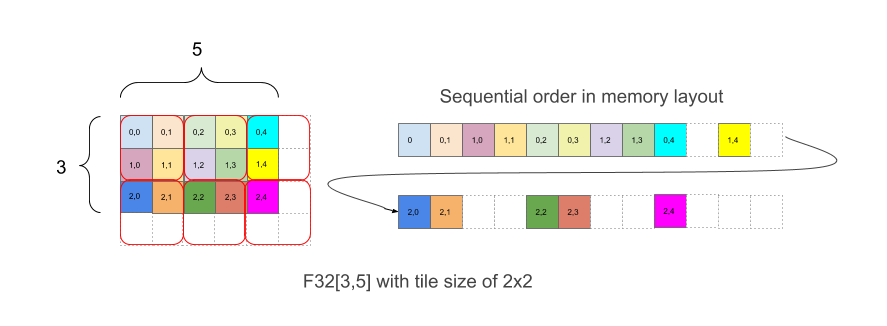
- written as
{1,0:T(2,2)}
7. repeated tiling
example: array with size 4x8 is tiled by two levels of tiling (first 2x4 then 2x1)
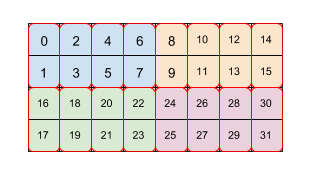
- tiling spec:
(2,4)(2,1) - each color is a 2x4 tile
- each red bos is a 2x1 tile
- numbers are the order in linear memory
8. combining dimensions using tiles
- tiling supports combining dimensions
- example:
F32[2,7,8,11,10]{4,3,2,1,0}can be combined intoF32[112,110]{1,0}first before tiling it with(2,3) - how? → we can specify tiling as
(∗,∗,2,∗,3) *means combine this dimension to the next more minor dimension
9. popular XLA tiling formats
- Untiled format: most arrays not on the TPU are untiled
- TPU tile format
- the most common format in XLA/TPU is tiling by
8x128 - it matches the 32-bit
8x128vector registers on a TPU.
- the most common format in XLA/TPU is tiling by
- TPU small tile format (a.k.a. “Compact 2nd Minor Layout”)
- when the 2nd most minor dimension size is 1 or 2, XLA/TPU instead tiles by
2x128- pupose: save memory since a
2x128tile is smaller than an8x128tile
- pupose: save memory since a
- when the wnd most minor dimension size is 3 or 4, XLA/TPU tiles by
4x128.
- when the 2nd most minor dimension size is 1 or 2, XLA/TPU instead tiles by
- TPU 16 bit tile format
when array element type is BF16, the tiles we use are typically (8,128)(2,1)
the sub-tiling does “BF16 packing”
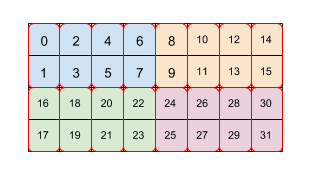
one element from an even row and one element from an odd row are laid out together and put in one 32-bit element
used because TPUs work with 32 bit values natively and it is much more efficient to move data across the second most minor dimension than across the most minor dimension
so collecting two 16 bit values to get 32 bits from the same column is much more efficient than doing it in the more obvious fashion of taking two 16 bit values from the same row.
- TPU 8 bit tile format
- similar to the 16 bit format,
- now we need to collect together 4 elements to get 32 bits
- so the tiling becomes
(8,128)(4,1).
- TPU 1 bit tile format
- TPUs currently use 1 byte for one boolean value
- it’s less wasteful to use a tiling by
(32,128)(32,1)and use only 1 bit per element