JAX 101
Given the length of the official JAX tutorial, this note distills the core concepts, providing an quick reference after reading the original tutorial.
High-level JAX stack
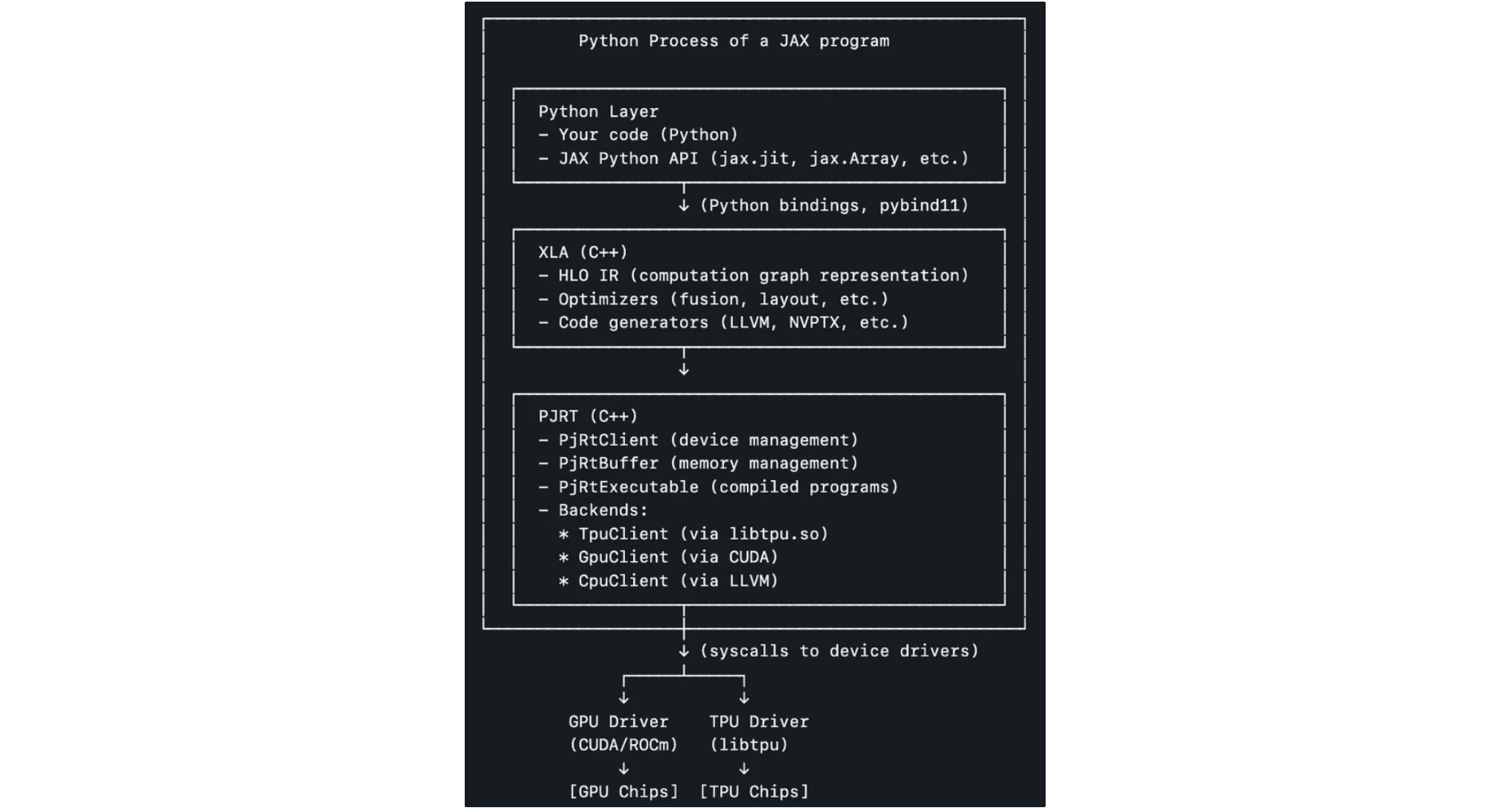
Source: Yi Wang’s linkedin post
Quick start
- https://docs.jax.dev/en/latest/notebooks/thinking_in_jax.html
- JAX arrays are immutable.
- device:
x.devices(); sharding:x.sharding - JIT function:
f_compiled = jit(f)- Not all JAX code can be JIT compiled, as it requires array shapes to be static & known at compile time.
1 | |
jax.vmap: write your function with a single data point (e.g., one vector, one image). Thenjax.vmaptransforms it to process the entire batch.- can be composed with
jax.jit
- can be composed with
1 | |
- random key: never reuse keys (unless you want identical outputs). In order to generate different and independent samples, you must
jax.random.splitthe key explicitly before passing it to a random function:
1 | |
The Sharp Bits (aka common mistakes)
https://docs.jax.dev/en/latest/notebooks/Common_Gotchas_in_JAX.html
- JAX works with pure functions
- all inputs are in function params, all outputs are function returns
- given same inputs, we always have same outputs (e.g.,
printis not allowed in the function) - not recommended to use iterators and any control-flow primitive in
jitfunction → error or unexpected results
- in-place updates
- JAX arrays are immutable. In-place updates like
jax_array[1, :] = 1.0yields an error - use
.atinstead:updated_array = jax_array.at[1, :].set(1.0), which is a out-of-place update that returns a new array.- similarly, we have other ops like
new_jax_array = jax_array.at[::2, 3:].add(7.0)
- similarly, we have other ops like
- JAX arrays are immutable. In-place updates like
- out-of-bounds indexing
- when the indexing op is an array index update (e.g.
index_addorscatter-like primitives), updates at out-of-bounds indices will be skipped- index_add:
jax_array.at[index].add(value)→ lowered into a scatter operation on GPU/TPU - scatter primitives: you give indices, and updates, then JAX writes them into an array
- index_add:
- when the op is an array index retrieval (e.g. NumPy indexing or
gather-like primitives) the index is clamped to the bounds since something must be returned- e.g.,
jnp.arange(10)[11]→ the last value will be returned
- e.g.,
- when the indexing op is an array index update (e.g.
- non-jax-array inputs
- don’t use python list, tuple or other non-array types as inputs for JAX → performance issues
- you can explicitly convert it to a jax array instead:
jnp.sum(jnp.array(x))
- dynamic shapes
- code used within transforms (like
jax.jit,jax.vmap, andjax.grad) requires all output arrays and intermediate arrays to have static shape
- code used within transforms (like
- JAX by default enforces single-precision numbers (claims
dtype=jnp.float64doesn’t work)- to use double, add
jax_enable_x64configuration variable at startup
- to use double, add
JAX 101
1. JIT
- JIT: make python function to be executed efficiently in XLA. recall this part

- How? → reducing a function to a sequence of primitives (can be viewed using
jax.make_jaxpr()) - It does not capture the side-effect code (like
print(), append the input to an external list, etc.). Don’t JIT-compile impure functions!- use
jax.debug.print()to debug printing instead (but performance will be worse)
- use
- When tracing, JAX wraps each arg by a tracer object (by default with shape and dtype), which records all JAX ops during the function call.
- The tracer records are used to reconstruct the entire function → output a jaxpr
1 | |
If we have a Python conditional, jaxpr only knows about the branch we take.
JIT won’t work for the following code
traced values like x and n, can only affect control flow via their static attributes (like shape or dtype), but not via their values
1
2
3
4
5
6
7def g(x, n):
i = 0
while i < n:
i += 1
return x + i
jax.jit(g)(10, 20) # Raises an errorwe can use special Control flow operators like
jax.lax.cond().or we can JIT-compile only part of the function
1
2
3
4
5
6
7
8
9@jax.jit
def loop_body(prev_i):
return prev_i + 1
def g_inner_jitted(x, n):
i = 0
while i < n:
i = loop_body(i)
return x + iwe can use
static_argnumsorstatic_argnames, but have to re-compile the function for every new value of the specified static input1
2
3
4
5
6
7
8
9def f(x):
if x < 3:
return 3. * x ** 2
else:
return -4 * x
f = jit(f, static_argnames='x')
print(f(2.))1
2
3
4
5
6
7from functools import partial
@partial(jit, static_argnums=(1,))
def f(x, neg):
return -x if neg else x
f(1, True)
JIT caching: when first calling a jit function, the function get compiled and cached.
2. Automatic vectorization
suppose we have a single conv function
1
2
3
4
5
6
7
8
9
10x = jnp.arange(5)
w = jnp.array([2., 3., 4.])
def convolve(x, w):
output = []
for i in range(1, len(x)-1):
output.append(jnp.dot(x[i-1:i+2], w))
return jnp.array(output)
convolve(x, w)with
jax.vmap(), it can receive batches of inputs (default batch dimension = 0)1
2
3
4xs = jnp.stack([x, x])
ws = jnp.stack([w, w])
auto_batch_convolve = jax.vmap(convolve)
auto_batch_convolve(xs, ws)we can use
in_axesandout_axesto specify batch dimensions1
2
3
4auto_batch_convolve_v2 = jax.vmap(convolve, in_axes=1, out_axes=1)
xst = jnp.transpose(xs)
wst = jnp.transpose(ws)
auto_batch_convolve_v2(xst, wst)example: convolve to a single set of weights
wwith a batch of vectorsx1
2batch_convolve_v3 = jax.vmap(convolve, in_axes=[0, None])
batch_convolve_v3(xs, w)jax.vmapcan be combined withjax.jit1
jitted_batch_convolve = jax.jit(auto_batch_convolve)
3. Pytrees
3.1 basics
a Pytree is simply a container of arrays. It can be a list, a tuple, a dict, or a nested combination of these. JAX functions are designed to accept these structures as inputs and return them as outputs smoothly.
a leaf is anything that’s not a pytree, such as an array, but a single leaf is also a pytree
pytree: any tree-like structure built out of container-like Python objects
- container-like: in pytree container registry; defaults are lists, tuples, and dicts
- object whose type is not in the pytree container registry → leaf node
in ML, a pytree can contain: model weights, dataset entries, RL observations, etc.
jax.tree.leaves(): flattened leaves from the trees1
2
3
4
5
6
7
8
9
10example_trees = [
[1, 'a', object()],
(1, (2, 3), ()),
[1, {'k1': 2, 'k2': (3, 4)}, 5],
{'a': 2, 'b': (2, 3)},
jnp.array([1, 2, 3]),
]
for pytree in example_trees:
leaves = jax.tree.leaves(pytree)
print(f"{repr(pytree):<45} has {len(leaves)} leaves: {leaves}")1
2
3
4
5[1, 'a', <object object at 0x7d8bcaf08490>] has 3 leaves: [1, 'a', <object object at 0x7d8bcaf08490>]
(1, (2, 3), ()) has 3 leaves: [1, 2, 3]
[1, {'k1': 2, 'k2': (3, 4)}, 5] has 5 leaves: [1, 2, 3, 4, 5]
{'a': 2, 'b': (2, 3)} has 3 leaves: [2, 2, 3]
Array([1, 2, 3], dtype=int32) has 1 leaves: [Array([1, 2, 3], dtype=int32)]jax.tree.map(f, tree): apply a function to every leaf in a nested data structure1
2
3
4
5
6
7list_of_lists = [
[1, 2, 3],
[1, 2],
[1, 2, 3, 4]
]
jax.tree.map(lambda x: x*2, list_of_lists)
# [[2, 4, 6], [2, 4], [2, 4, 6, 8]]1
2another_list_of_lists = list_of_lists
jax.tree.map(lambda x, y: x+y, list_of_lists, another_list_of_lists)view pytree definition
1
2
3from jax.tree_util import tree_structure
print(tree_structure(object))
# PyTreeDef(*)pytree and JAX transformations
- many JAX functions operates over pytrees of arrays
- all JAX function transformations can be applied to functions whose inputs and outputs are pytrees of arrays
in_axesandout_axesarguments tojax.vmap()can also be pytrees (structure must match the corresponding arguments)example: function
fhas has an input like(a1, {"k1": a2, "k2": a3})- a variable
a1 - a dict containing keys
k1(valuea2) andk2(valuea3)
- a variable
we can use
jax.vmap(f, in_axes=(None, {"k1": None, "k2": 0}))- you want to vectorize (loop over) the data in
k2, but nota1ork1(they are constants/broadcasted)
- you want to vectorize (loop over) the data in
a single leaf value can be applied to an entire sub-pytree
1
2jax.vmap(f, in_axes=(None, 0))
# equivalent to (None, {"k1": 0, "k2": 0})1
jax.vmap(f, in_axes=0) # equivalent to (0, {"k1": 0, "k2": 0})
3.2 key paths
each leaf has a key path (i.e., a list of keys, list length = tree depth of the leaf)
key type depends on node type; e.g., key type for dicts is different from key type for tuples
SequenceKey(idx: int): For lists and tuples.- this key type is used for nodes that are ordered sequences and accessed by an integer index.
- key content: An integer index specifying the position.
DictKey(key: Hashable): For dictionaries.GetAttrKey(name: str): For namedtuples and preferably custom pytree nodes (more in the next section)
jax.tree_util.tree_flatten_with_path(): similar tojax.tree.flatten(), but returns flattened key paths1
2
3
4
5
6
7
8
9
10
11
12
13
14example_trees = [
[1, 'a', object()],
(1, (2, 3), ()),
jnp.array([1, 2, 3]),
]
jax.tree_util.tree_flatten_with_path(example_trees)
# ([((SequenceKey(idx=0), SequenceKey(idx=0)), 1),
# ((SequenceKey(idx=0), SequenceKey(idx=1)), 'a'),
# ((SequenceKey(idx=0), SequenceKey(idx=2)), <object at 0x70d4e8c6b600>),
# ((SequenceKey(idx=1), SequenceKey(idx=0)), 1),
# ((SequenceKey(idx=1), SequenceKey(idx=1), SequenceKey(idx=0)), 2),
# ((SequenceKey(idx=1), SequenceKey(idx=1), SequenceKey(idx=1)), 3),
# ((SequenceKey(idx=2),), Array([1, 2, 3], dtype=int32))],
# PyTreeDef([[*, *, *], (*, (*, *), ()), *]))jax.tree_util.tree_map_with_path(): similar tojax.tree.map(), but the inputs are also key pathsjax.tree_util.keystr(): given a key path, returns a reader-friendly stringexample
1
2
3
4
5
6
7
8
9
10
11
12
13
14
15import collections
ATuple = collections.namedtuple("ATuple", ('name'))
tree = [1, {'k1': 2, 'k2': (3, 4)}, ATuple('foo')]
flattened, _ = jax.tree_util.tree_flatten_with_path(tree)
for key_path, value in flattened:
print(f'Value of tree{jax.tree_util.keystr(key_path)}: {value}')
# Value of tree[0]: 1
# Value of tree[1]['k1']: 2
# Value of tree[1]['k2'][0]: 3
# Value of tree[1]['k2'][1]: 4
# Value of tree[2].name: foo
3.3 common mistakes
accidentally introducing tree nodes instead of leaves
1
2
3
4
5
6
7a_tree = [jnp.zeros((2, 3)), jnp.zeros((3, 4))]
# Try to make another pytree with ones instead of zeros.
shapes = jax.tree.map(lambda x: x.shape, a_tree)
jax.tree.map(jnp.ones, shapes)
# [(Array([1., 1.], dtype=float32), Array([1., 1., 1.], dtype=float32)),
# (Array([1., 1., 1.], dtype=float32), Array([1., 1., 1., 1.], dtype=float32))]shapeof an array is a tuple, which is a pytree node, with its elements as leaves.- the map instead of calling
jnp.oneson e.g.(2, 3), it’s called on2and3.
jax.tree_utilfunctions treatNoneas the absence of a pytree node, not as a leaf1
2
3
4
5jax.tree.leaves([None, None, None])
# []
# fix
jax.tree.leaves([None, None, None], is_leaf=lambda x: x is None)
3.4 common pytree patterns
- transposing pytrees
transpose: turn a list of trees into a tree of lists
option1 (basic):
jax.tree.map()1
2
3
4
5
6
7
8def tree_transpose(list_of_trees):
return jax.tree.map(lambda *xs: list(xs), *list_of_trees)
# Convert a dataset from row-major to column-major.
episode_steps = [dict(t=1, obs=3), dict(t=2, obs=4)]
tree_transpose(episode_steps)
# *xs are tuples {'obs': (3, 4), 't': (1, 2)}
# with lambda, they are converted to lists {'obs': [3, 4], 't': [1, 2]}option2 (comple but flexible):
jax.tree.transpose()1
2
3
4
5jax.tree.transpose(
outer_treedef = jax.tree.structure([0 for e in episode_steps]),
inner_treedef = jax.tree.structure(episode_steps[0]),
pytree_to_transpose = episode_steps
)
4. Intro to parallel programming
4.1 Basics
this tutorial is for SPMD program: same computation (e.g., forward pass), different data (e.g., different inputs in a batch) in parallel on different devices (e.g., TPUs)
we cover auto sharding (
jax.jit()), explicit sharding, and fully manual sharding (jax.shard_map(), per-device sharding + explicit collectives)jax.Arrayis designed with distributed data and computation in mind. It hasjax.sharding.Shardingobject.by default, arrays are on a single device
1
2
3
4
5import jax
jax.config.update('jax_num_cpu_devices', 8)
arr = jnp.arange(32.0).reshape(4, 8)
arr.devices()
# {CpuDevice(id=0)}visualize sharding:
jax.debug.visualize_array_sharding()define sharding
1 | |
4.2 auto sharding via jax.jit()
- you specify how inputs/outputs are sharded,
jax.jit()will automatically- partition everything inside
- compile inter-device communications
- example with element-wise function: same sharding as inputs
1 | |
- example with reduce
1 | |
4.3 Explicit sharding (sharding-in-types)
- the JAX-level type of a value includes how the value is sharded
1 | |
- we can query the type in
jit
1 | |
- set up an explicit-sharding mesh
1 | |
4.4 Manual parallelism with shard_map
you write the function for a single shard, and
jax.shard_map()constructs the full functionshard_map()maps over shardsin_specsdetermines the shard sizes- split 32 elements in
arrto 8 devices (4 elements / device)
- split 32 elements in
out_specsidentifies how blocks are assembled back together- the outputs coming from the devices represent chunks split along axis
'x' - it must concatenate (glue) these 8 chunks back together in order to form the final global array
- the outputs coming from the devices represent chunks split along axis
1
2
3
4
5
6
7
8
9
10
11
12
13
14mesh = jax.make_mesh((8,), ('x',))
@jax.jit
def f_elementwise(x):
return 2 * jnp.sin(x) + 1
f_elementwise_sharded = jax.shard_map(
f_elementwise,
mesh=mesh,
in_specs=P('x'),
out_specs=P('x'))
arr = jnp.arange(32)
f_elementwise_sharded(arr)the function can only see a single shard
1
2
3
4
5
6
7
8x = jnp.arange(32)
print(f"global shape: {x.shape=}")
def f(x):
print(f"device local shape: {x.shape=}")
return x * 2
y = jax.shard_map(f, mesh=mesh, in_specs=P('x'), out_specs=P('x'))(x)
# global shape: x.shape=(32,)
# device local shape: x.shape=(4,)be careful about aggregation-like functions
1 | |
- you need
jax.lax.psum()to get a single sum
1 | |
4.5 Data / computation placement on devices
- In JAX, the computation follows data placement
- 2 placement properties
- the device where the data resides
- whether it is committed to the device or not
- default: uncommitted on
jax.devices()[0]
- data with
jax.device_put()becomes committed to the device. example:arr = device_put(1, jax.devices()[2])
5. Structured control flow with JIT
if we want to use control flow that’s traceable, and that avoids un-rolling large loops, there are 4 structured control flow:
lax.cond()
semantics:
1 | |
example:
1 | |
lax.while_loop()
semantics:
1 | |
example:
1 | |
lax.fori_loop()
semantics:
1 | |
example:
1 | |
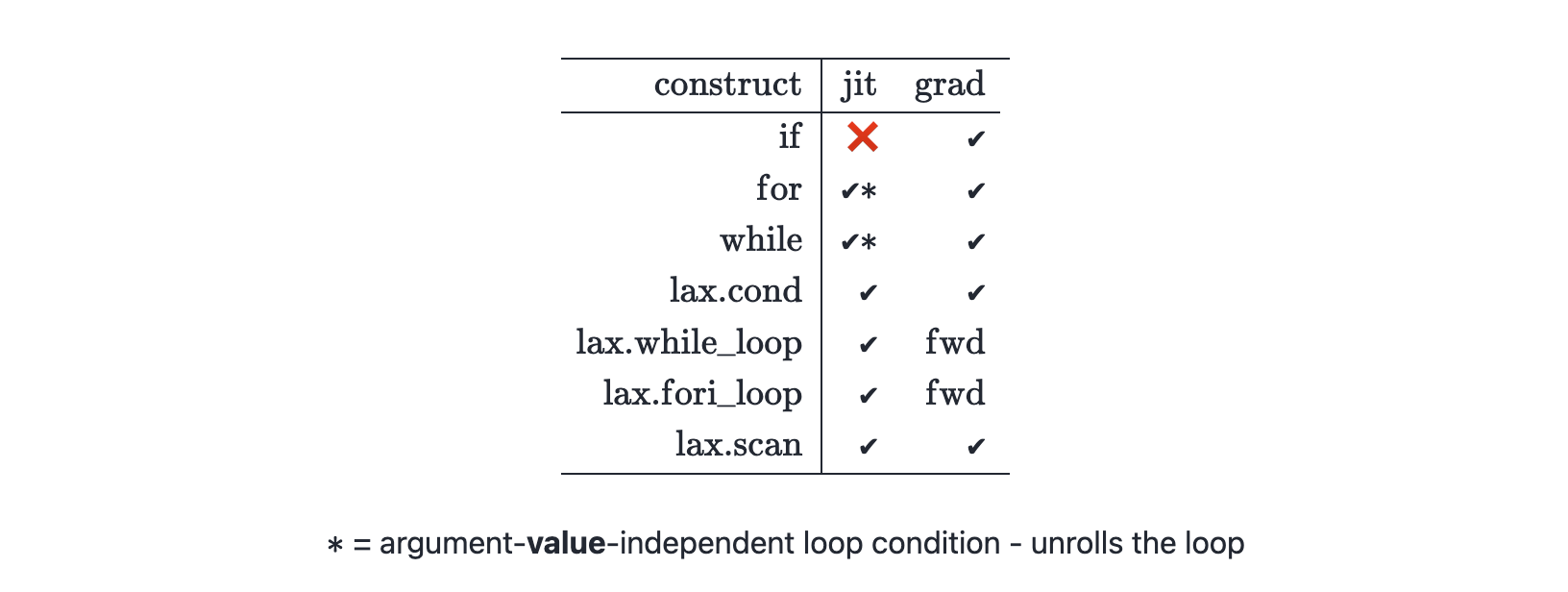
6. Static vs traced ops
- the following will lead to an error, because when we use
jnp.arrayandjnp.prodon the static valuex.shape, it becomes a traced value
1 | |
- use
numpyfor operations that should be static (i.e. done at compile-time) - use
jax.numpyfor operations that should be traced (i.e. compiled and executed at run-time) - fix:
1 | |
7. Stateful computation
- JAX transformations (like
jit(),vmap(), andgrad()) replies on pure functions - how to make stateful computations? → add explicit state as arg
- suppose we have
1 | |
- to use it with
jax.jit(), we can do
1 | |